
Download OpenAPI specification:Download
This documentation describes how to retrieve and update information relating to your organisations teams.
Assemble supports an unlimited level and number of teams, sometimes referred to as hierarchy locations. Teams allow you to configure Assemble to reflect the structure of your organisation.
In addition to roles, each user must be placed in a team within your organisation. This will determine who can manage them and, if they are a supervisor, who they can manage. Therefore, it is important to make sure that your teams are configured in a logical manner that best fits your organisation.
Below is an example team structure a national organisation may have.
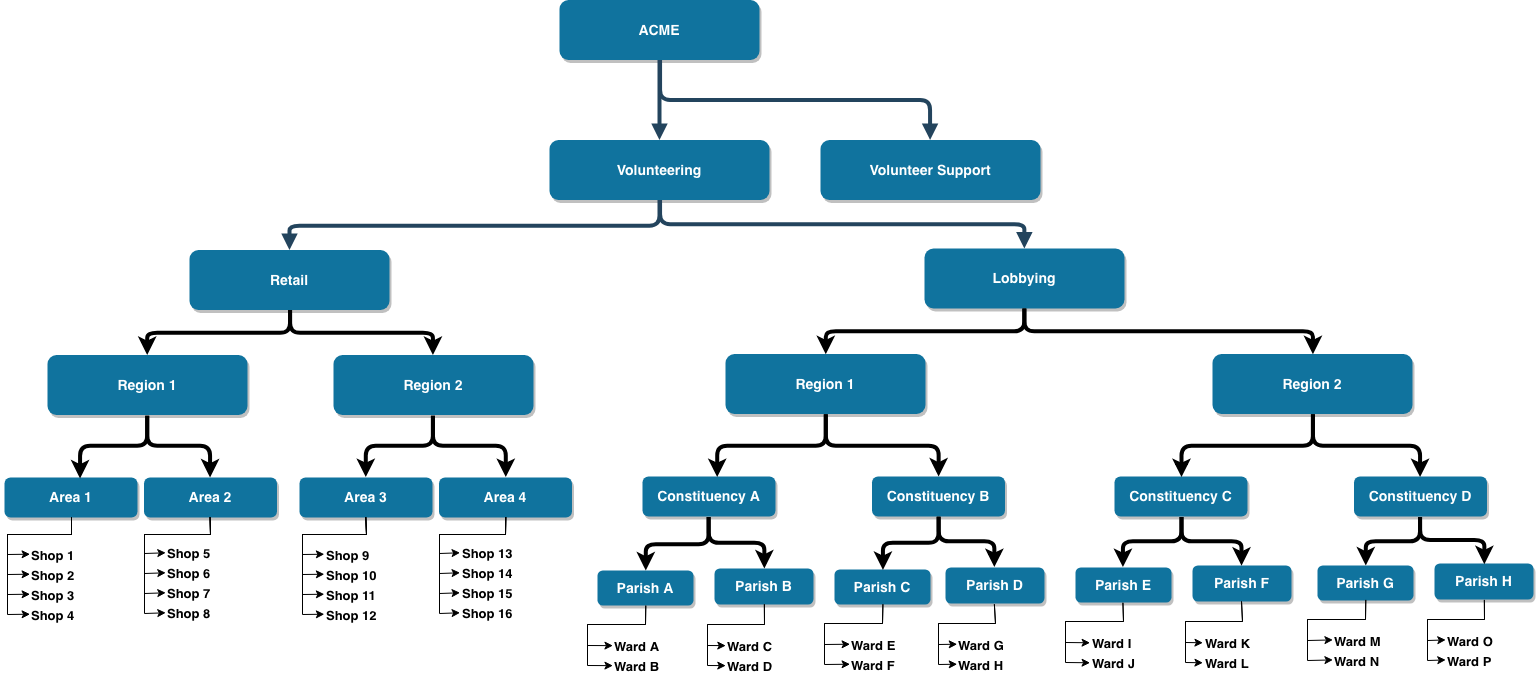
Click here to find more information about teams.
Retrieve a paginated list of teams.
The response will only include teams that the authenticated user has access to.
| q | string Search teams by name and unique custom fields |
| hidden | boolean Default: "false" Include or exclude hidden teams |
| rota | boolean Only include teams that have a rota |
| include | string Enum: "parent" "children" "location" "attributes" "catchment_area" Available includes for a team (comma separated list) |
Array of objects (Team) | |
object |
{- "data": [
- {
- "id": "3521",
- "display_name": "Headquarters",
- "parent_id": 0,
- "name": "string",
- "description": "string",
- "geo_location": "string",
- "catchment_area_id": "string",
- "icon": "string",
- "show_on_public_site": true,
- "ceiling_enabled": true,
- "hidden": true,
- "disabled": true,
- "external_reference": "string"
}
], - "meta": {
- "pagination": {
- "total": "string",
- "count": "string",
- "per_page": "string",
- "current_page": "string",
- "total_pages": "string",
- "links": {
- "next": "string",
- "previous": "string"
}
}
}
}Create a new team
| parent_id | integer Nullable ID of the parent team |
| name | string Teams name |
| description | string Description of the team |
| geo_location | string Nullable Geo location ID |
| catchment_area_id | string Nullable Catchment area id |
| icon | string FontAwesome 4 icon class |
| show_on_public_site | boolean Determine if this team should appear on the public site |
| ceiling_enabled | boolean Determine if ceilings is enabled for this team |
| hidden | boolean Determine if this team has been hidden |
| disabled | boolean Determine if this team is disabled for the current authenticated user |
| external_reference | string Teams external reference |
object (Team) Detailed team information |
{- "parent_id": 0,
- "name": "string",
- "description": "string",
- "geo_location": "string",
- "catchment_area_id": "string",
- "icon": "string",
- "show_on_public_site": true,
- "ceiling_enabled": true,
- "hidden": true,
- "disabled": true,
- "external_reference": "string"
}{- "data": {
- "id": "3521",
- "display_name": "Headquarters",
- "parent_id": 0,
- "name": "string",
- "description": "string",
- "geo_location": "string",
- "catchment_area_id": "string",
- "icon": "string",
- "show_on_public_site": true,
- "ceiling_enabled": true,
- "hidden": true,
- "disabled": true,
- "external_reference": "string"
}
}Retrieve a recursive response of teams.
You can optionally pass a team id in the path to specifiy the starting point of the recursion (i.e /organisation/teams/recursive/{teamId}).
The response may include teams that the authenticated user cannot manage but are required to be in the response in order for the recursive structure to exist. These teams will be marked as disabled.
| mine | boolean Determine if we should only display the authenticated users teams |
| include | string Enum: "parent" "children" "location" "attributes" "catchment_area" Available includes for a team (comma separated list) |
| id | string The teams unique id |
| display_name | string Team display name |
| parent_id | integer Nullable ID of the parent team |
| name | string Teams name |
| description | string Description of the team |
| geo_location | string Nullable Geo location ID |
| catchment_area_id | string Nullable Catchment area id |
| icon | string FontAwesome 4 icon class |
| show_on_public_site | boolean Determine if this team should appear on the public site |
| ceiling_enabled | boolean Determine if ceilings is enabled for this team |
| public_url | string <uri> Nullable Teams public URL |
| hidden | boolean Determine if this team has been hidden |
| disabled | boolean Determine if this team is disabled for the current authenticated user |
| external_reference | string Teams external reference |
Array of objects (Team) The teams children. Recursively. |
[- {
- "id": "3521",
- "display_name": "Headquarters",
- "parent_id": 0,
- "name": "string",
- "description": "string",
- "geo_location": "string",
- "catchment_area_id": "string",
- "icon": "string",
- "show_on_public_site": true,
- "ceiling_enabled": true,
- "hidden": true,
- "disabled": true,
- "external_reference": "string",
- "children": [
- {
- "id": "3521",
- "display_name": "Headquarters",
- "parent_id": 0,
- "name": "string",
- "description": "string",
- "geo_location": "string",
- "catchment_area_id": "string",
- "icon": "string",
- "show_on_public_site": true,
- "ceiling_enabled": true,
- "hidden": true,
- "disabled": true,
- "external_reference": "string"
}
]
}
]Retrieve an existing teams information
| id required | string Example: 21321 Team ID |
object (Team) Detailed team information |
{- "data": {
- "id": "3521",
- "display_name": "Headquarters",
- "parent_id": 0,
- "name": "string",
- "description": "string",
- "geo_location": "string",
- "catchment_area_id": "string",
- "icon": "string",
- "show_on_public_site": true,
- "ceiling_enabled": true,
- "hidden": true,
- "disabled": true,
- "external_reference": "string"
}
}Update an existing teams information.
The information you can update will depend on your permissions.
| id required | string Example: 21321 Team ID |
| parent_id | integer Nullable ID of the parent team |
| name | string Teams name |
| description | string Description of the team |
| geo_location | string Nullable Geo location ID |
| catchment_area_id | string Nullable Catchment area id |
| icon | string FontAwesome 4 icon class |
| show_on_public_site | boolean Determine if this team should appear on the public site |
| ceiling_enabled | boolean Determine if ceilings is enabled for this team |
| hidden | boolean Determine if this team has been hidden |
| disabled | boolean Determine if this team is disabled for the current authenticated user |
| external_reference | string Teams external reference |
object (Team) Detailed team information |
{- "parent_id": 0,
- "name": "string",
- "description": "string",
- "geo_location": "string",
- "catchment_area_id": "string",
- "icon": "string",
- "show_on_public_site": true,
- "ceiling_enabled": true,
- "hidden": true,
- "disabled": true,
- "external_reference": "string"
}{- "data": {
- "id": "3521",
- "display_name": "Headquarters",
- "parent_id": 0,
- "name": "string",
- "description": "string",
- "geo_location": "string",
- "catchment_area_id": "string",
- "icon": "string",
- "show_on_public_site": true,
- "ceiling_enabled": true,
- "hidden": true,
- "disabled": true,
- "external_reference": "string"
}
}Hide a team.
You can only hide a team that has no active children, no active users and no active opportunities.
| id required | string Example: 21321 Team ID |
{- "message": "400 Bad request",
- "status_code": "400"
}